Getting started with Feature Engineering in Databricks Unity Catalog
The Feature Engineering in Databricks Unity Catalog allows you to create a centralized repository of features. These features can be used to train & call your ML models. By saving features as feature engineering tables in Unity Catalog, you will be able to:
- Share features across your organization
- Increase discoverability sharing
- Ensures that the same feature computation code is used for model training and inference
- Enable real-time backend, leveraging your Delta Lake tables for batch training and Key-Value store for realtime inferences
Demo content
Multiple version of this demo are available, each version introducing a new concept and capabilities. We recommend following them one by one.
Introduction (this notebook)
- Ingest and prepare raw data.
- Create and register Feature Tables in Unity Catalog.
- Use `FeatureLookup` to join multiple feature sources.
- Train a model using the **Feature Engineering Client** (`FeatureEngineeringClient`).
- Register and promote the model to production in **Unity Catalog**.
- Perform **batch inference** using feature lineage.
Advanced version ([open the notebook]($./002_Feature_store_advanced))
- Combine multiple Feature Tables using **point-in-time lookup**.
- Create **Online Feature Tables** for real-time serving.
- Build and publish a **Feature Spec** for online inference.
- Deploy and query **Feature Serving Endpoints**.
- Serve a **UC-registered model** in real time with automatic feature lookup.
Spark Declarative Pipeline Feature Creation ([open the notebook]($./003_Feature_store_pipeline))
- Demonstrate how to build and manage feature tables declaratively using Lakeflow pipelines.
With a simple Python decorator like `@dp.materialized_view`, Databricks can automatically orchestrate feature dependencies, manage schema evolution, and handle refresh schedules — unifying feature engineering and pipeline orchestration within a single framework.
*For more detail on the Feature Engineering in Unity Catalog, open the documentation.*

Building a Travel Purchase Propensity Model
In this demo, we’ll take on the role of a **travel booking platform** looking to increase revenue by personalizing travel and hotel offers.
Our goal as data scientists is to build a simple **Travel Purchase Propensity Model** — a model that predicts the likelihood that a user will purchase a specific travel package.
This will serve as the foundation for personalized recommendations and targeted marketing campaigns.
For this **introductory version**, we’ll keep things simple and focus on the fundamentals of Feature Engineering in Unity Catalog:
- Start from the **travel purchase logs**, which capture user interactions such as clicks, prices, and bookings.
- Create a **Feature Table** (`destination_location_fs`) that aggregates travel-related behaviors (e.g., total destination clicks, average price, conversion rate).
- Generate a second **Feature Table** (`user_demography`) that includes static user attributes such as age, income bracket, loyalty tier, and billing location.
- Use the **Feature Engineering Client** to join these features, train a baseline model, and log it into Unity Catalog with feature lineage.
- Finally, perform **batch inference** using the same features to predict which users are most likely to make a purchase.
> 💡 The goal of this notebook is to introduce the core concepts of Feature Tables and how they integrate with the model lifecycle in Databricks — not to optimize model accuracy.
Note that a Data Sciencist would typically start by exploring the data. We could also use the data profiler integrated into Databricks Notebooks to quickly identify if we have missings values or a skew in our data.
*We will keep this part simple as we'll focus on feature engineering*
1: Create our Feature Engineering table
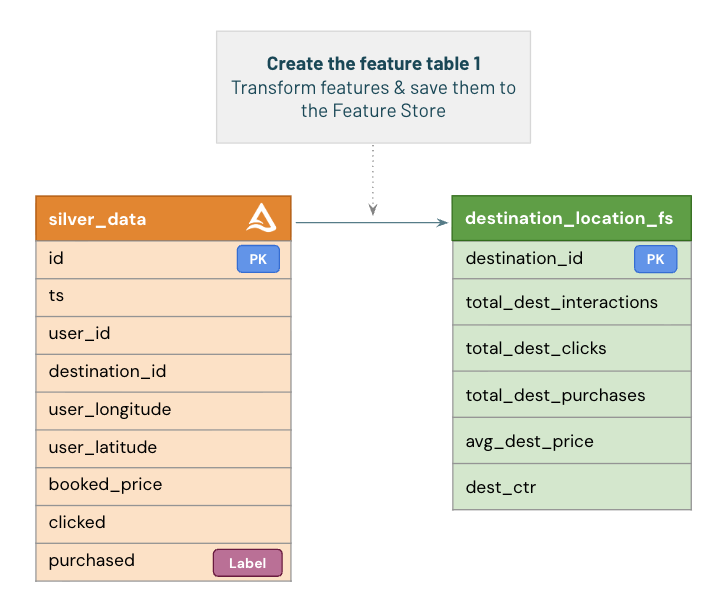
Creating the First Feature Table
Our first step is to create a **Feature Table** in Unity Catalog.
We’ll start by loading data from the **silver table** `travel_purchase`, which contains user interactions such as clicks, prices, and purchases.
From these values, we’ll engineer new features that can be used by our model.
In this introductory version, we’ll focus on a few simple transformations:
- Deriving aggregated destination-level features such as total clicks, purchases, and conversion rates.
- Dropping the label column (`purchased`) to prevent feature leakage during model training.
To create the feature table, we’ll use the `FeatureEngineeringClient.create_table()` API.
Under the hood, this writes the feature data as a **Delta Table** in Unity Catalog and registers it as a managed feature table for reuse.
💡 In a production environment, this logic would typically live in a **scheduled feature pipeline or Lakeflow job** that refreshes features automatically whenever new data arrives in the silver table.
Compute the features
Let's create the features that we'll save in our Feature Table using simple SQL query.
This transformation would typically be part of a job used to refresh our feature, triggered for model training and inference so that the features are computed with the same code.
Save the Feature Engineering Table
Next, we will save our feature as a Feature Engineering Table using the **`create_table`** method.
We'll need to give it a name and a primary key that we'll use for lookup. Primary key should be unique. In this case we'll use the booking id.
Let's start creating a Feature Engineering Client. Calling `create_table` on this client will result in a table being created in Unity Catalog.
Alternatively, you can first **`create_table`** with a schema only, and populate data to the feature table with **`fs.write_table`**. To add data you can simply use **`fs.write_table`** again. **`fs.write_table`** supports a **`merge`** mode to update features based on the primary key. To overwrite a feature table you can simply `DELETE` the existing records directly from the feature table before writing new data to it, again with **`fs.write_table`**.
Creating a Feature Table from an Existing Unity Catalog Table
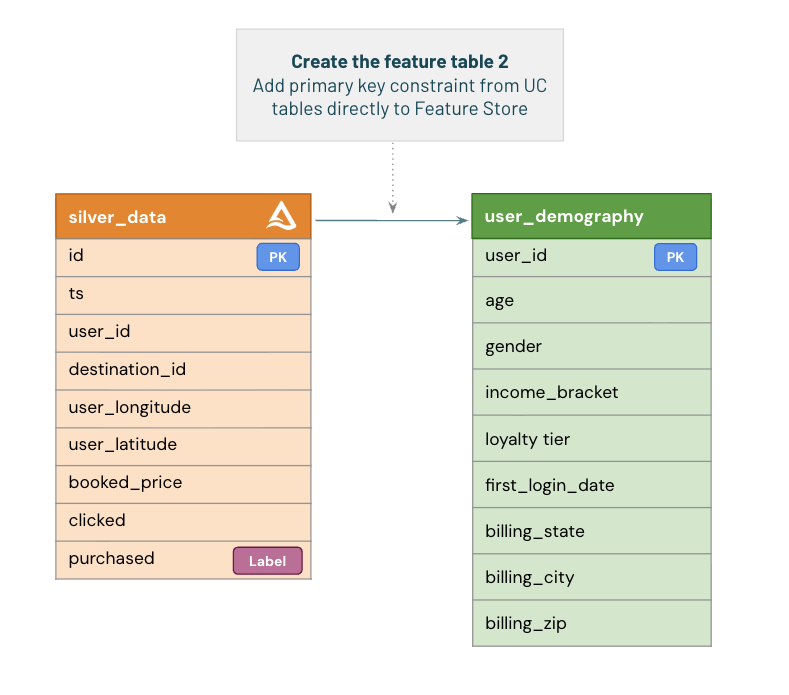
In some cases, your feature data may already exist as a Delta table in Unity Catalog.
For example, our **user demographic data** (age, gender, income, loyalty tier, billing location, etc.) is stored in an existing table.
To use this table as a **Feature Table**, you simply need to define a **primary key constraint**.
Once the primary key is set, the table automatically appears in the **Features** tab within Unity Catalog and becomes available for retrieval using `FeatureLookup`.
> 💡 You do **not** need to call `fe.create_table()` again — that step is only required when creating a new feature table directly from a DataFrame.
Our Feature Table is now available in Unity Catalog

You can explore it directly from the **Unity Catalog Explorer**:
1. Select your **catalog** and **schema**.
2. Browse the list of **Feature Tables** to find the one you just created (`user_demography` or `destination_location_fs`).
3. Click the table name to view its schema, sample data, and metadata.
In addition to using the UI, you can also inspect the table programmatically with:
```python
fe.get_table(name="destination_location_fs")
2: Train a model with FS
Now that our Feature Tables are ready, we can train a machine learning model using the features stored in Unity Catalog.
The first step is to build our **training dataset**.
We’ll start with a list of entity identifiers (in this case, `destination_id` and `user_id`) and their corresponding label (`purchased`) — the outcome we want to predict.
Using a `FeatureLookup` list, we’ll automatically retrieve all related features from our registered Feature Tables.
The lookup process joins the raw label dataset with the appropriate feature tables based on the defined **lookup keys**.
Once our feature-enriched training dataset is ready, we’ll:
1. Train a baseline model using these features.
2. Log and register the model in Unity Catalog with full **feature lineage** tracking.
3. Deploy the model to **production** for batch inference.
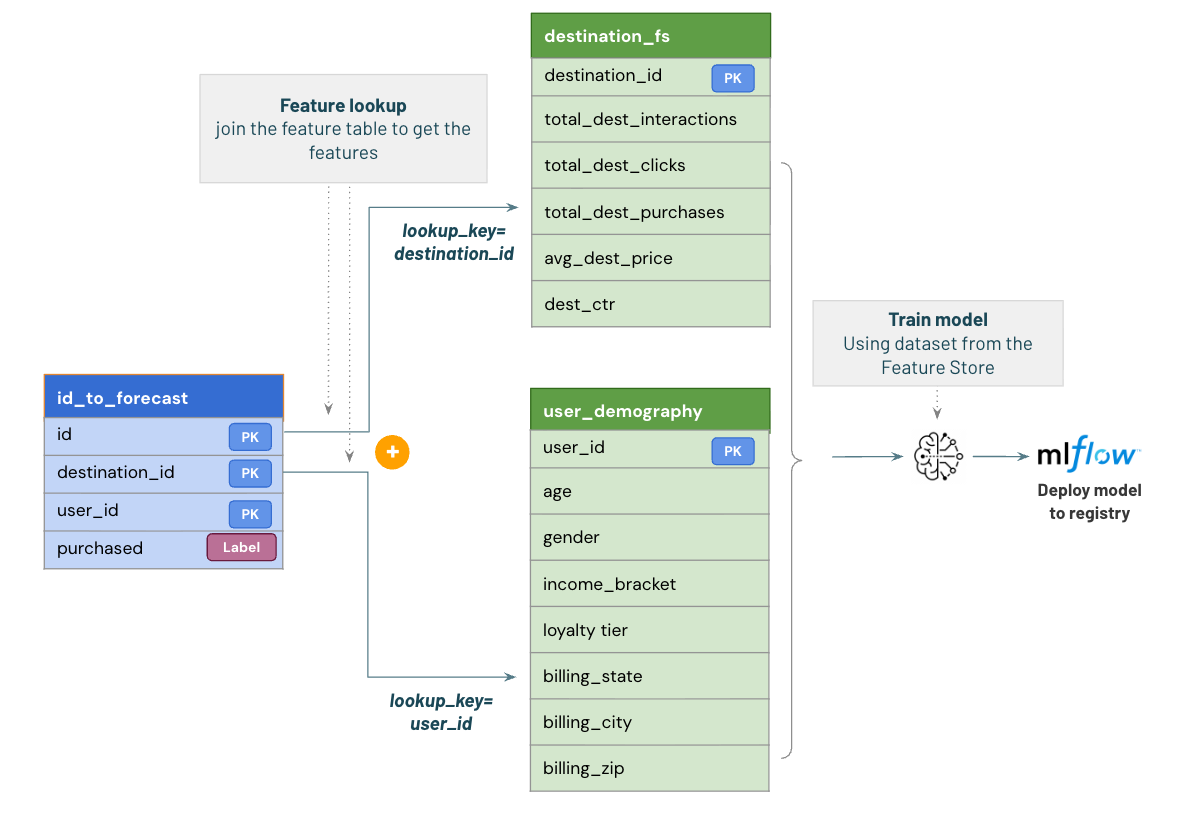
Build the training dataset
Let's start by building the dataset, retrieving features from our feature table.
Introducing Databricks Assistant Data Science Agent
The Data Science Agent elevates the Databricks Assistant from a helpful copilot into a true autonomous partner for data science and analytics. Fully integrated with Databricks Notebooks and the SQL Editor, the [Data Science Agent](https://www.databricks.com/blog/introducing-databricks-assistant-data-science-agent) let's you analyze your data and build ML models in a few clicks/prompt.

- Data Science Agent transforms Databricks Assistant into an autonomous partner for data science and analytics tasks in Notebooks and the SQL Editor.
- It can explore data, generate and run code, and fix errors, all from a single prompt. This can cut hours of work to minutes.
- Purpose-built for common data science tasks and grounded in Unity Catalog for seamless, governed access to your data.
Open the assistant and give it a try!
Training our baseline model
Note that for our first basic example, the feature used are very limited and our model will very likely not be efficient, but we won't focus on the model performance.
The following steps will be a basic LGBM model. Note that to log the model, we'll use the `FeatureEngineeringClient.log_model(...)` function and not the usual `mlflow.skearn.log_model(...)`. This will capture all the feature dependencies & lineage for us and update the feature table data.
Our model is now saved in Unity Catalog.

You can open the right menu to see the newly created "lightGBM" experiment, containing the model.
In addition, the model also appears in Catalog Explorer, under the catalog we created earlier. This way, our tables and models are logically grouped together under the same catalog, making it easy to see all assets, whether data or models, associated with a catalog.
Table lineage
Lineage is automatically captured and visible within Unity Catalog. It tracks all tables up to the model created.
This makes it easy to track all your data usage, and downstream impact. If some PII information got leaked, or some incorrect data is loaded and detected by the Lakehouse Monitoring, it's then easy to track the potential impact.
Note that this not only includes table and model, but also Notebooks, Dashboard, Jobs triggering the run etc.

Move the model to Production
Because we used the `registered_model_name` parameter, our model was automatically added to the registry.
We can now chose to move it in Production.
*Note that a typical ML pipeline would first run some tests & validation before doing moving the model as Production. We'll skip this step to focus on the Feature Engineering capabilities*
3: Running inferences
We are now ready to run inferences.
In a real world setup, we would receive new data from our customers and have our job incrementally refreshing our customer features running in parallel.
To make the predictions, all we need to have is the primary keys for each feature loopup table. Feature Engineering in UC will automatically do the lookup for us as defined in the training steps.
This is one of the great outcome using the Feature Engineering in UC: you know that your features will be used the same way for inference as training because it's being saved with your feature store metadata.
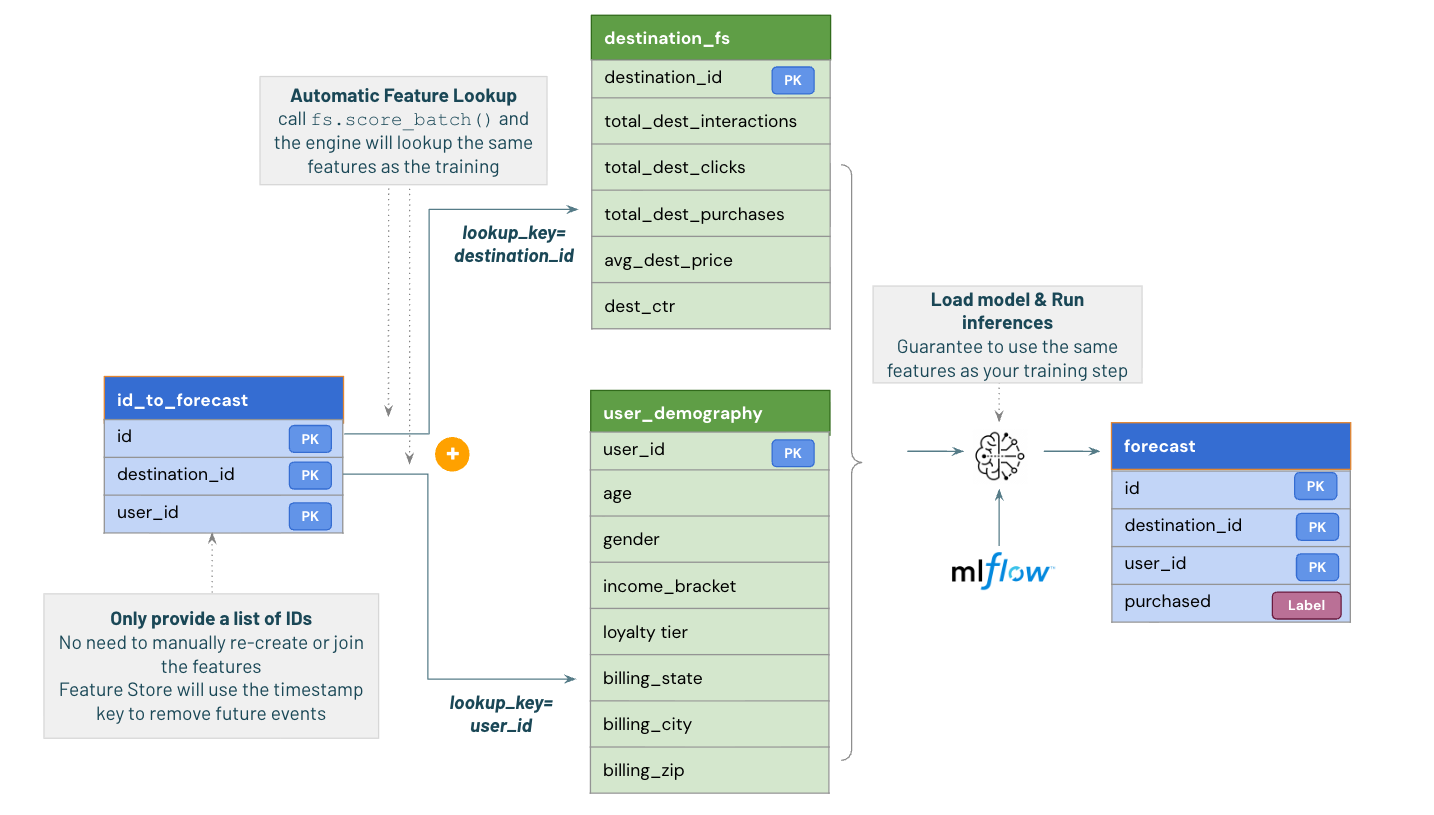
Note that while we only selected a list of ID, we get back as result our prediction (is this user likely to book this travel `True`/`False`) and the full list of features automatically retrieved from our feature table.
Summary
We've seen a first basic example, creating two Feature Engineering table and training a model on top of that.
Databricks Feature Engineering in Unity Catalog brings you a full traceability, knowing which model is using which feature in which notebook/job.
It also simplify inferences by always making sure the same features will be used for model training and inference, always querying the same feature table based on your lookup keys.
Next Steps
We'll go more in details and introduce more feature engineering capabilities in the next demos:
Open the [02_Feature_store_advanced notebook]($./002_Feature_store_advanced) to explore more Feature Engineering in Unity Catalog benefits & capabilities:
- Combine multiple Feature Tables using **point-in-time lookup**.
- Create **Online Feature Tables** for real-time serving.
- Build and publish a **Feature Spec** for online inference.
- Deploy and query **Feature Serving Endpoints**.
- Serve a **UC-registered model** in real time with automatic feature lookup.