Feature store Travel Agency recommendation - Advanced
In this advanced demo, we’ll explore more powerful capabilities of Feature Engineering in Databricks Unity Catalog, building on top of the previous introductory notebook.
We’ll continue with the same use case — a Travel Agency Recommender Model — which aims to increase revenue by personalizing travel and hotel offers based on the likelihood that each user will make a purchase.
This version goes deeper into temporal and online feature management, demonstrating how Databricks enables both accurate offline training and real-time serving.
What You’ll Learn
- **Build advanced features across multiple Feature Tables**
Create user-level and destination-level features, including rolling aggregates and time-aware statistics.
- **Introduce a timestamp key for point-in-time lookups**
Ensure that features used during training reflect only information available up to that point in time — eliminating data leakage.
- **Combine multiple feature tables using `FeatureLookup`**
Automatically join features from different entities (e.g., users and destinations) during training.
- **Train and register a model using the Feature Engineering Client**
Use feature-enriched data to train a custom model, log it with feature lineage, and register it in Unity Catalog.
- **Publish Online Feature Tables for real-time inference/serving**
Sync your Delta Tables to Online Feature Stores powered by Databricks Lakebase — enabling low-latency access to features for serving endpoints or external applications.
By the end of this notebook, you’ll understand how to move from batch feature engineering to a fully automated, real-time ML system — where your models and feature pipelines stay consistent, governed, and production-ready within Unity Catalog.

1: Create our Feature Tables

In this second example, we'll introduce more tables and new features calculated with window functions.
To simplify updates & refresh, we'll split them in 2 tables:
* **User features**: contains all the features for a given user in a given point in time (location, previous purchases if any, tenure days etc)
* **Destination features**: data on the travel destination for a given point in time (interest tracked by the number of clicks & impression)
Point-in-time support for feature tables
Databricks Feature Store supports use cases that require point-in-time correctness.
The data used to train a model often has time dependencies built into it. In our case, because we are adding rolling-window features, our Feature Table will contain data on all the dataset timeframe.
When we build our model, we must consider only feature values up until the time of the observed target value. If you do not explicitly take into account the timestamp of each observation, you might inadvertently use feature values measured after the timestamp of the target value for training. This is called “data leakage” and can negatively affect the model’s performance.
Time series feature tables include a timestamp key column that ensures that each row in the training dataset represents the latest known feature values as of the row’s timestamp.
In our case, this timestamp key will be the `ts` field, present in our 2 feature tables.
Calculating the features
Let's calculate the aggregated features from the vacation purchase logs for destinations and users.
The user features capture the user profile information such as past purchased price. Because the booking data does not change very often, it can be computed once per day in batch.
The destination features include popularity features such as impressions and clicks, as well as pricing features such as price at the time of booking.
Creating the Feature Table
Let's use the FeatureStore client to save our 2 tables. Note the `timestamp_keys='ts'` parameters that we're adding during the table creation.
Databricks Feature Store will use this information to automatically filter features and prevent from potential leakage.

As in our previous example, the 2 feature store tables were created and are available within Unity Catalog.
You can explore Catalog Explorer. You'll find all the features created, including a reference to this notebook and the version used during the feature table creation.
Note that the id ts are automatically defined as PK and TS PK columns.
Now that our features are ready, we can start creating the training dataset and train your customized models!
2: Train a model with FS and timestamp lookup
The next step is to build a training dataset.
Because we have 2 feature tables, we'll add 2 `FeatureLookup` entries, specifying the key so that the feature store engine can join using this field.
We will also add the `timestamp_lookup_key` property to `ts` so that the engine filter the features based on this key.
Training the Model with Custom scikit-learn Pipelines
In this session we’ll manually train a **custom scikit-learn classification model** using the features retrieved from the Feature Store.
We’ll build a preprocessing and modeling pipeline that includes:
- A `ColumnTransformer` to handle both numerical and categorical features
- Standardization and one-hot encoding for consistent feature scaling
- A set of classification models include `LightGBMClassifier`, `Random Forest` as our core algorithms for predicting travel purchases
Throughout the process, we’ll use **MLflow tracking** and the **Feature Engineering Client** to:
- Train multiple models with model selection on the best model
- Log our best performed model, parameters, and metrics
- Capture full feature lineage from the Feature Store
- Register the trained model in **Unity Catalog** for governance and deployment
This approach provides full control over feature engineering, preprocessing, and model selection, and maintaining the same reproducibility and lineage benefits.
Saving our best model to MLflow registry
Next, we'll log the best model as a new run using the `FeatureStoreClient.log_model()` function.
3: Running batch inference
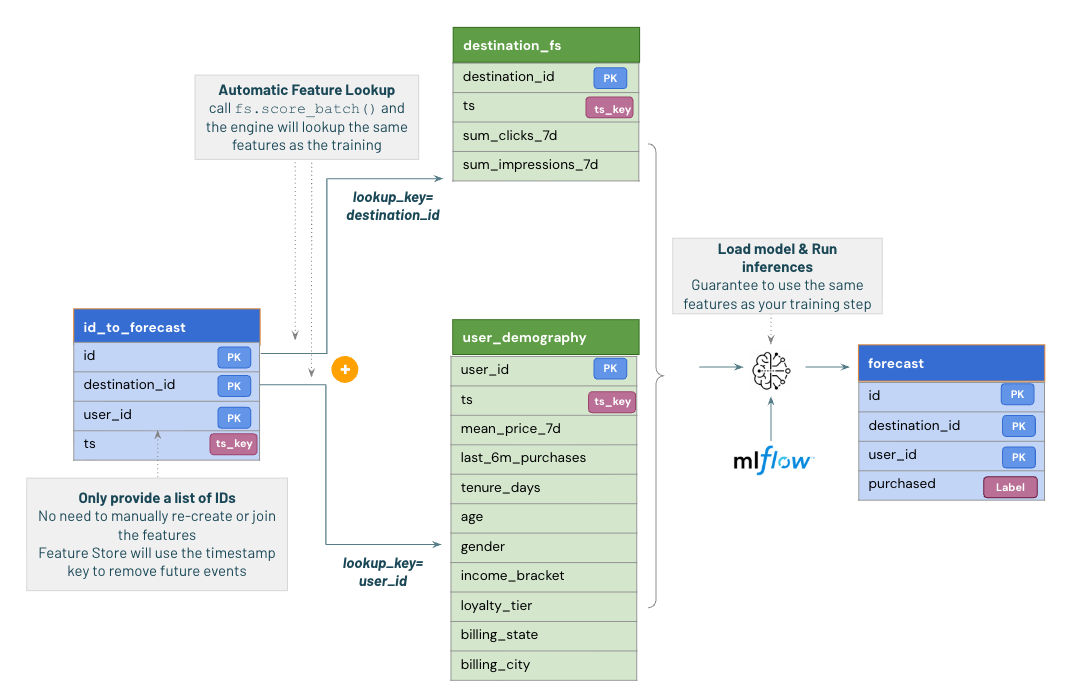
As we saw previously, we can easily leverage the feature store to get our predictions.
No need to fetch or recompute the feature, we just need the lookup ids and the feature store will automatically fetch them from the feature store table.
4: Real-Time Inference with Databricks Online Feature Stores

Databricks now supports **Online Feature Stores**, providing a fully managed and low-latency key–value lookup service for real-time machine learning applications.
In this advanced demo, we publish our offline feature tables (for example, `user_features_advanced` and `destination_features_advanced`) to an **online feature store** using the `FeatureEngineeringClient.publish_table()` API.
Once published, these tables are continuously synchronized with their Delta source tables, ensuring that your real-time applications always access the latest feature values.
With the online tables in place, we can:
- Create a **Feature Spec** to define which features should be fetched for inference
- Build a **Feature Serving Endpoint** that exposes these features through an API
- Connect the endpoint to our **Unity Catalog–registered ML model**, allowing it to automatically fetch the latest features for each incoming request
This architecture enables **end-to-end real-time prediction**, where feature retrieval and model inference happen within milliseconds — all governed and tracked within Unity Catalog.
Creating the online feature store

The capacity options correspond to different performance tiers "CU_1", "CU_2", "CU_4", and "CU_8". Each capacity unit allocates about 16GB of RAM to the database instance, along with all associated CPU and local SSD resources.
Once you created the online store, it should be avaiable under Compute -> Lakebase Postgres
Publish a feature table to an online storePrerequisites for publishing to online stores
All feature tables (with or without time series) must meet these requirements before publishing:
- **Primary key constraint**: Required for online store publishing
- **Non-nullable primary keys**: Primary key columns cannot contain NULL values
- **Change Data Feed enabled**: Required for online store sync. See [Enable change data feed](https://docs.databricks.com/aws/en/delta/delta-change-data-feed
enable)
After your online store is in the AVAILABLE state, you can publish feature tables to make them available for low-latency access.
Our online feature tables are available in the Unity Catalog Explorer, like any other tables!

We can see that our online table has been successfully created.
Like any other table, it's available within the Unity Catalog explorer, in your catalog -> schema.
5. Real-time Serving Scenarios
There are two main ways to operationalize your features and models:
Option 1. Feature Serving Endpoint (for external applications)
Use when your application or model runs outside of Databricks, but still needs low-latency access to features.
Databricks will automatically keep the online feature tables in sync, and your application can fetch the latest features via a REST API.
Option 2. Model Serving Endpoint (for in-Databricks inference)
Use when your model is deployed in Databricks Model Serving.
The model automatically performs online feature lookups from the published tables — no extra feature-joining logic required.
This enables true real-time inference with consistent feature definitions across training, batch scoring, and serving.

Option 1. Feature Serving Endpoint (for external applications)Option 1 - Step 1: Create a FeatureSpec
A FeatureSpec is a user-defined set of features and functions. You can combine features and functions in a FeatureSpec. FeatureSpecs are stored in and managed by Unity Catalog and appear in Catalog Explorer.
Option 1 - Step 2: Create a Feature serving endpoint
The FeatureSpec defines the endpoint, once the feature serving endpoint is created, click Serving in the left sidebar of the Databricks UI. When the state is Ready, the endpoint is ready to respond to queries.
Option 1 - Step 3: Query the feature serving endpoint
You can use the REST API, the MLflow Deployments SDK, or the Serving UI to query an endpoint in order to get real-time access to the calculated features.
Option 2. Model Serving Endpoint (for in-Databricks inference)
When you use Mosaic AI Model Serving to serve a model that was built using features from Databricks, the model automatically looks up and transforms features for inference requests.
Option 2 - Step 1: Create a model serving endpoint
The following variables set the values for configuring the model serving endpoint, such as the endpoint name, compute type, and which model to serve with the endpoint. After you call the create endpoint API, the logged model is deployed to the endpoint.
View your endpoint
For more information about your endpoint, go to the Serving UI and search for your endpoint name.
Option 2 - Step 2: Query your endpoint
Once your endpoint is ready, you can query it by making an API request to run predictions. Depending on the model size and complexity, it can take 30 minutes or more for the endpoint to get ready.
Summary
In this advanced demo, we’ve built a complete feature lifecycle using Databricks Feature Store — from creating timestamp-aware user and destination features to training and deploying a real-time recommendation model.
With Unity Catalog integration, every feature and model is fully governed and traceable. You can now see exactly which model depends on which feature table, and trace it back to the notebook or job that created it.
By registering the model through `fe.log_model()`, we’ve ensured automatic feature lookups during inference — whether the model runs in batch jobs or is served in real time through Databricks Model Serving.
This guarantees that the same features used in training are consistently retrieved for inference, eliminating data leakage and mismatches.
Next Step: Spark Declarative Feature Pipelines with Lakeflow

Next, we’ll demonstrate how to build and manage feature tables declaratively using Lakeflow pipelines.
With a simple Python decorator like `@dp.materialized_view`, Databricks can automatically orchestrate feature dependencies, manage schema evolution, and handle refresh schedules — unifying feature engineering and pipeline orchestration within a single framework.