Fine-tuning your LLM with Databricks Mosaic AI
Fine Tuning LLMs is the action of specializing an existing model to your own requirements.
Technically speaking, you start from the weights of an existing foundation model (such as DBRX or LLAMA), and add another training round based on your own dataset.
Why Fine Tuning?
Databricks provides an easy way to specialize existing foundation models, making sure you own and control your model while also getting better performance, lower cost, and tighter security and privacy.
The typical fine-tuning use cases are:
* Train a model on specific, internal knowledge
* Customize model behavior, ex: specialized entity extraction
* Reduce model size and inference cost, while improving answer quality
Continued Pre-Training vs Instruction Fine Tuning?
Databricks Fine Tuning API enables you to adapt your model in several different ways:
* **Supervised fine-tuning**: Train your model on structured prompt-response data. Use this to adapt your model to a new task, change its response style, or add instruction-following capabilities).
* **Continued pre-training**: Train your model with additional unlabeled text data. Use this to add new knowledge to a model or focus a model on a specific domain. Requires several millions of token to be relevant.
* **Chat completion**: Train your model on chat logs between a user and an AI assistant. This format can be used both for actual chat logs, and as a standard format for question answering and conversational text. The text is automatically formatted into the appropriate chat format for the specific model.
we'll use the **Chat Completion** api as it is the recommended way. Using this, Databricks will properly format the system prompt based on your underlying model.
Want to access our more advanced demos?
If you already know how to use the Fine Tuning API, you can directly jump to the advanced demos:
- [Named Entity Extraction and evaluation]($./03-entity-extraction-fine-tuning/03.1-llm-entity-extraction-drug-fine-tuning)
- [RAG LLM fine tuning]($./02-chatbot-rag-fine-tuning/02.1-llm-rag-fine-tuning)
Fine Tuning to classify our customer tickets and accelerate time to resolution
In this demo, we will show you how to specialize a LLM to classify URGENT / CRITICAL tickets and put them with a high priority in the queue.

We'll fine tune a small Llama 3.2-3B to improve accuracy while reducing cost.
- We will compare this to a Llama 3.1-8B baseline model to show how a fine-tuned, smaller model can perform better than a larger one.
To do so, Databricks provides a simple, built-in API to fine tune the model and evaluate its performance. Let's get started!
Documentation for Fine Tuning on Databricks:
- Overview page: [Databricks Fine-tuning APIs](https://docs.databricks.com/en/large-language-models/foundation-model-training/index.html)
- SDK Guide: [Setting up a fine-tuning session with Fine-tuning APIs](https://docs.databricks.com/en/large-language-models/foundation-model-training/create-fine-tune-run.html)
Preparing our Training Dataset

Lets take a look at our current support tickets
Based on the ticket text (emails or other), we want to train our model to predict its priority:
Crafting our prompt to classify the ticket
Let's craft a prompt example to classify the tickets, including a few shot prompt example to make it as good as possible:
Lets use the standalone llama 3.1 8b model to test it on a vanilla model first. Set up a [provisioned throughput endpoint](https://docs.databricks.com/en/machine-learning/foundation-models/deploy-prov-throughput-foundation-model-apis.html) for llama 3.1 8b by going to unity catalog, (under `system.ai.meta_llama_3_8b_instruct`), clicking "Serve this model" and making the endpoint.
- Be sure to check the "Scale to zero" field to ensure that the endpoint doesn't continue running when not in use.
- Give the endpoint a name and reference it below.
As you can see, this isn't ideal. It's adding lot of text, and isn't classifying properly our dataset (resultat might vary depending on the size of the model used).
Preparing the Dataset for Chat Completion for Fine Tuning

Using the completion API is always recommended as default option as Databricks will properly format the final training prompt for you.
Chat completion requires a list of **role** and **prompt**, following the OpenAI standard. This standard has the benefit of transforming our input into a prompt following our LLM instruction pattern.
Note that each foundation model might be trained with a different instruction type, so it's best to use the same type when fine tuning.
*We recommend using Chat Completion whenever possible.*
```
[
{"role": "system", "content": "[system prompt]"},
{"role": "user", "content": "Here is a documentation page:[RAG context]. Based on this, answer the following question: [user question]"},
{"role": "assistant", "content": "[answer]"}
]
```
*Remember that your Fine Tuning dataset should be the same format as the one you're using for your RAG application.
*
Training Data Type
Databricks supports a large variety of dataset formats (Volume files, Delta tables, and public Hugging Face datasets in .jsonl format), but we recommend preparing the dataset as Delta tables within your Catalog as part of a proper data pipeline to ensure production quality.
*Remember, this step is critical and you need to make sure your training dataset is of high quality.*
Let's create a small pandas UDF to help create our final chat completion dataset.
Starting a Fine Tuning Run

Once the training is done, your model will automatically be saved within Unity Catalog and available for you to serve!
In this demo, we'll be using the API on the table we just created to programatically fine tune our LLM.
However, you can also create a new Fine Tuning experiment from the UI!
Let's fine tune a Llama 3.2-3B model to see how it performs by comparison.
Tracking Fine Tuning Runs via the MLFlow Experiment
To monitor the progress of an ongoing or past fine tuning run, you can open the run from the MLFlow Experiment. Here you will find valuable information on how you may wish to tweak future runs to get better results. For example:
* Adding more epochs if you see your model still improving at the end of your run
* Increasing learning rate if loss is decreasing, but very slowly
* Decreasing learning rate if loss is fluctuating widely

Deploy Fine Tuned Model to a Serving Endpoint
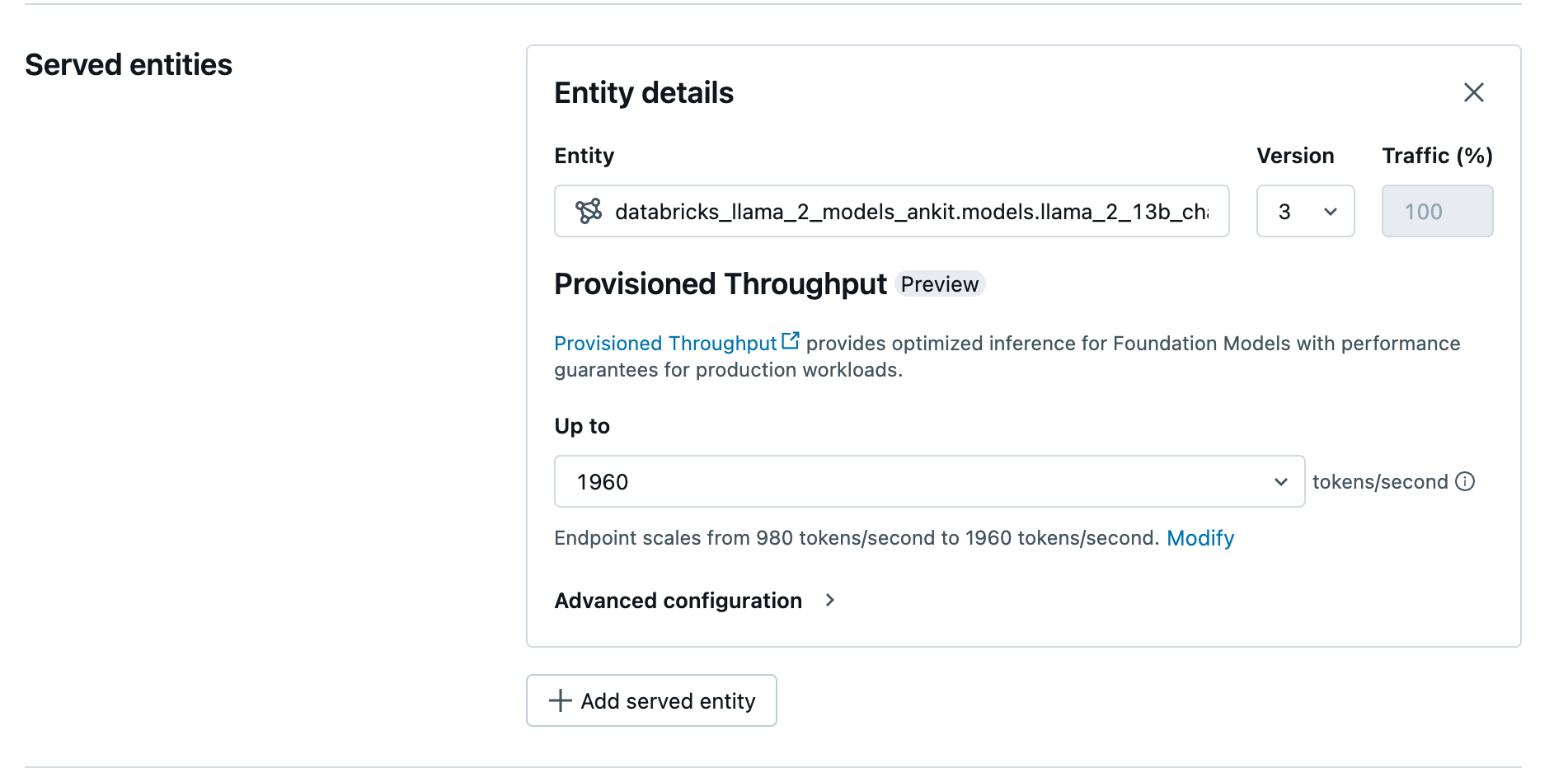
Once ready, the model will be available in Unity Catalog.
From here, you can use the UI to deploy your model, or you can use the API. For reproducibility, we'll be using the API below:
Testing the Model Endpoint

That's it! We're now ready to serve our Fine Tuned model and start asking questions!
The reponses will now be improved and specialized from the Databricks documentation and our RAG chatbot formatted output!
Next steps
In this notebook, we covered the basics on Fine Tuning using Databricks Mosaic AI FT API.
A few extra steps are usually required to test and evaluate your Fine Tune model before deploying them in production.
Explore the 2 other use-cases to discover:
Fine tune your Chat Bot / Assistant RAG model
[Open the 02.1-llm-rag-fine-tuning]($./02-chatbot-rag-fine-tuning/02.1-llm-rag-fine-tuning) notebook to explore how to evaluate your LLM using Databricks built-in eval capabilities.
Entity extraction and evaluation
[Open the 03.1-llm-entity-extraction-drug-fine-tuning]($./03-entity-extraction-fine-tuning/03.1-llm-entity-extraction-drug-fine-tuning) notebook for a Named Entity Extraction (NER) example, benchmarking the based model with the Fine Tuned one.